
Although I’m still not a big fan of Gutenberg, it is the default WordPress editor — and therefore the future of WordPress. Especially now that Full Site Editing (FSE) is becoming more mature, allowing you to design not only the content of your pages, but also elements like your header, footer, blog templates, WooCommerce templates, and more.
That said, Gutenberg itself offers very limited design flexibility out of the box. Fortunately, more and more plugins are extending its capabilities, and Greenshift has been my personal favorite for several years now.
Dozens of new Gutenberg blocks in the free version of Greenshift
In the free version of Greenshift, you get access to dozens of additional Gutenberg blocks with a wide range of advanced options.
Like most plugins in this category, Greenshift includes an advanced text block, a button block for creating stylish buttons with icons, an icon list block to add those icons to lists, a slider, an advanced tabs block (including vertical tabs), an accordion block, and more.
On top of that, Greenshift also offers several blocks that you don’t usually find in other block add-ons. These include social media share buttons, an (animated) SVG shape that you can use as a divider, and — very cool — a sliding panel / popup trigger that lets you create an off-canvas panel or popup that appears when someone clicks a button or after a set amount of time.
Within these types of blocks — such as the sliding panel, as well as tabs, accordions, sliders, and more — you can place other blocks, allowing you to add any type of content you want. This applies to most block add-on plugins, but in other page builders like Elementor or Divi, this isn’t always the case (although newer versions of those builders often do support this as well).
When it comes to styling options, Greenshift also offers more flexibility than (the free versions of) other Gutenberg add-ons like Stackable and Kadence.
For example, the advanced text block allows you to add animated text as well as gradient colors. You can apply animations to all Greenshift blocks, and even CSS transform options are included in the free version — with separate hover settings. This means you can, for instance, make an image scale up or rotate when someone hovers over it.
Layout options: CSS grid, flexbox and calculated width
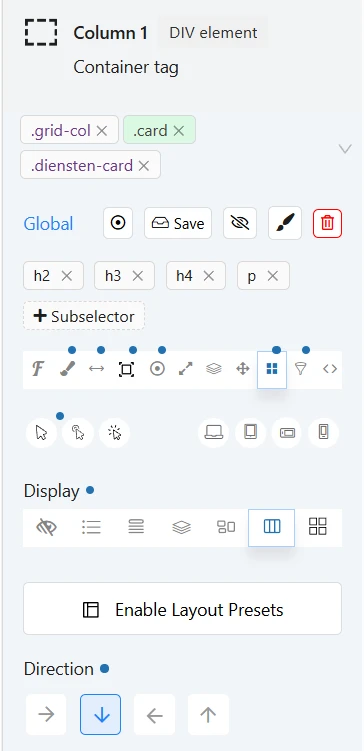
Greenshift also offers very extensive layout options. For example, it includes a container block where you can choose between a flexbox layout or a CSS grid layout. That might not mean much at first, but it’s extremely useful for making your layout responsive for mobile devices, or for aligning content in the center or at the bottom of a column.
With CSS grid, for example, you can easily display 4 columns on desktop, 3 columns on tablets, and 2 columns on smartphones. Greenshift also distinguishes between smartphones in landscape and portrait mode — giving you four breakpoints in total, which are also fully customizable.
Another unique feature is the option to make columns swipeable on smaller screens. Normally, columns are stacked vertically on mobile, but in Greenshift you can also choose to display them side-by-side in a slider format (with or without navigation arrows and auto-rotating slides).
On top of that, you can work with variable widths — not just percentages or vh/vw units, but also calculated widths for containers, including min and max settings. Fluid typography is also fully supported.
Greenlight Elements blocks
In addition to the standard Greenshift blocks, the plugin also includes a set of special blocks under the name Greenlight Elements. These blocks are more geared towards professional users, and I therefore try to use Greenlight Elements wherever possible.
Class first workflow
To ensure your website remains consistent and easy to maintain, you should handle styling using classes. For example, I always create a “card” class. In this class, I define that a card has a white background, a shadow, rounded corners, and a certain amount of padding. I use this class on almost every page; anywhere you see white content blocks on a background, the “card” class is applied.
If I want a specific element to look like a card, I don’t need to set all those styles individually — I simply add the card class. And if I ever want to change the appearance of my cards, I only need to update it in one place, and the change is automatically applied everywhere the class is used.
Want to learn more about Greenlight and how classes work?
Check out my Greenshift Full Site Build series on YouTube.
Interaction layers
Another very powerful feature in Greenshift — and something most competitors don’t offer — is Interaction Layers. With this feature, you can assign a trigger and a corresponding action to any Greenshift block.
For example, the trigger could be a click on a button, and the action could be opening a popup. But you can also show or hide an element when hovering over another element, add scroll-based animations, or even add or remove CSS classes dynamically.
This is also how the sticky button at the bottom of this page works. It becomes visible and sticky after scrolling a certain number of pixels down the page. That behavior is also created using Interaction Layers.
Built for speed
Since Google announced that website speed is taken into account as a ranking factor, website owners have been frantically looking for ways to achieve the highest possible score in Google PageSpeed Insights.
With Greenshift, this becomes much easier, as the developer has optimized the plugin specifically for high performance scores.
For example, only the code that is actually needed for the blocks used on a page is loaded, and no external libraries are required. Google Fonts, for instance, are stored locally, and icons are generated on the fly.
Greenshift Premium addons
All of the above is included in the free version of Greenshift. However, there are also several premium add-ons available that add even more functionality to this already very feature-rich plugin.
Instead of offering a single premium version that includes all premium blocks and features, the developer of Greenshift has chosen to provide several bundles, each focused on specific functionality. There is also a bundle available that includes all premium extensions.
Get Greenshift All-in-one bundleQuery Addon
The Query Add-on is, in my opinion, the most interesting extension. It allows you to build your own templates, for example to display blog posts in a custom layout or to create a custom shop page for your WooCommerce store.
You have full control over what you want to show in such a layout, and you can fully customize the styling to your preference.
You can build custom loops, such as an overview of all your blog posts or products, and define how those items should be displayed. This makes use of dynamic content, meaning elements like the title, excerpt, read more link, author, and publish date are automatically populated.

In addition to standard WordPress data, you can also use custom fields added with a plugin like ACF. The same applies to the single post template — the template used for individual posts or products.
This add-on also includes a conditional logic block. This is a container block in which you can place other blocks, and then show or hide them based on specific conditions.
For example, you can display blocks only to logged-in users (or only to logged-out users), only for posts in a certain category (or exclude specific categories), only on certain pages, only for products with a specific shipping class or within a certain price range, or even based on custom field values.
In addition, the Query Add-on brings this conditional logic functionality directly into every Greenshift and Greenlight block.
It also includes a filter block. A common example would be a clothing webshop where users can filter products by price, color, size, and more.
Another useful feature is the dynamic search block. This allows you to create a search function where results appear as you type. You can fully customize the design and define which post types should be included in the search.
Finally, the add-on also includes a few additional blocks, such as a (dynamic) gallery block, a voting block (thumbs up/down or +/-), and a login popup builder.
See all Query Add-on blocks in action
Get Greenshift Query AddonWooCommerce Addon
If you run a WooCommerce store, Greenshift’s WooCommerce add-on offers a wide range of features to take your webshop to the next level.
Not only does this add-on allow you to fully customize your product loops (such as shop pages, category pages, and featured products on your homepage), it also lets you add advanced functionality like a wishlist, quick view (a popup showing key product details), and product comparison tables.
Other features of the WooCommerce add-on include product bundles, a progress bar showing how much more a customer needs to spend to qualify for free shipping, product swatches (such as colors or images), a 360-degree product viewer, video support in the gallery, and more.
See all WooCommerce add-on blocks in action
Get Greenshift WooCommerce addonAnimation addon
The free version of Greenshift already includes entrance animations, but the Animation Add-on takes your animation capabilities to the next level. It adds the GSAP animation library to all Greenshift blocks — the same library used by the popular motion.page.
This allows you to animate text word by word or even letter by letter using a custom effect, which you can fully configure to your liking. You can also automatically apply animations to child items. For example, you can make columns appear one by one without having to set up a separate animation for each column.
The most important block in this add-on is the Animation Container, which lets you add advanced animations to any content placed inside it. This makes it possible to create multi-step animations, complex scroll-based animations, or even animations along a specific SVG path.
Finally, this add-on also allows you to create beautiful parallax effects.
See all Animation add-on blocks in action
Get Greenshift animation addonSEO and Marketing Addon
The final add-on is the SEO and Marketing Add-on. The Greenshift team is also behind the popular REHub theme, which is mainly designed for bloggers who earn money through affiliate marketing.
This add-on includes dedicated blocks for product comparisons (tables that let you list all key features side by side), a “how-to” block that makes it easy to present step-by-step instructions, and a review box where you can define your own criteria and ratings. The average score is calculated automatically, and you can also add pros and cons, and more.
It also includes a block that allows you to insert a WooCommerce product into your post, or even display a list of multiple products.
Other noteworthy blocks in this add-on include an (image) hotspot block, which lets you display custom content when a user hovers over an icon, and a link hider extension that allows you to hide links from Google while still showing them to users. The latter, however, seems to go against Google’s guidelines.
See all SEO and Marketing addon blocks in action
Get Greenshift SEO and Marketing addonConclusion
Greenshift has been my favorite page builder for several years now. The wide range of useful blocks, combined with highly flexible class-first styling options, the versatile layout controls, the four custom breakpoints for optimizing designs across different screen sizes, and the built-in performance optimizations make it a dream tool for web developers.
A smart choice was made to split the premium add-ons, allowing you to only pay for the features that are relevant to you. There is also an all-in-one package available that includes all premium add-ons.

Leave a Reply